Advertisement / Affiliate disclosure: This review contains affiliate links. If you purchase through them, I may earn a commission at no additional cost to you.
CreatorClawAI Review: What $17 Buys, What the Demo Shows, and Who Should Skip It
- Review basis: Demo walkthrough — no paid account used
- Sources: Official sales page, JV material, official demo video
- Last verified: October 13, 2026
- Editorial score: 3.75/5 (research-based)
Quick Verdict
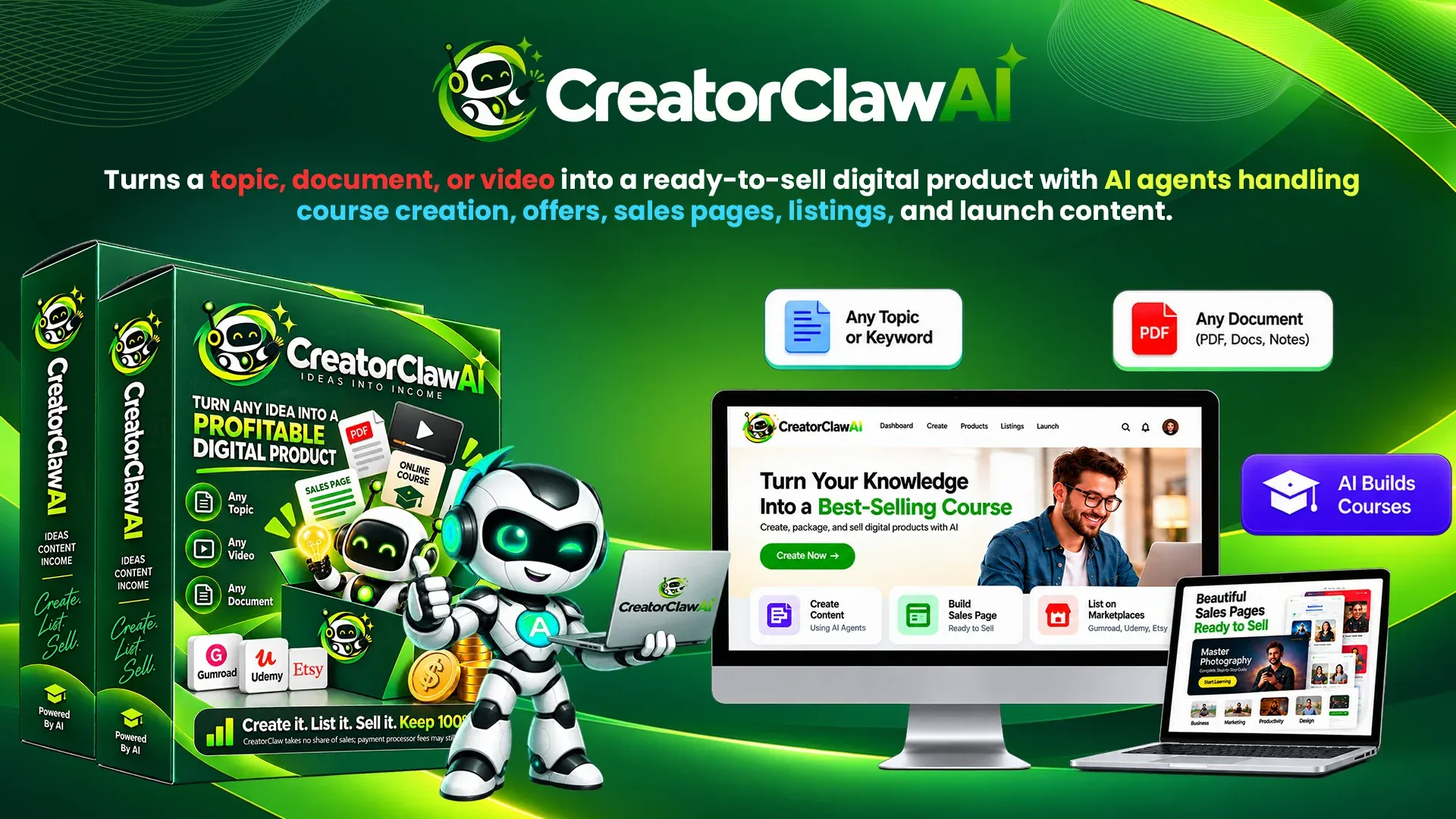
CreatorClaw AI turns one typed topic — or an uploaded PDF, document, or video — into a sellable course: curriculum, quizzes, workbook, AI-voiced videos, listing packs, and promo clips, under a commercial license that lets you keep 100% of every sale.
The official demo is unusually revealing for a launch product: a real dashboard, a completed seven-agent project, a 46-page course PDF, a rendered 54-second AI video, extracted clips, and a store with Stripe checkout. What it does not show matters too — no full-length lesson render, no marketplace upload, and exactly one $97 order in the demo account, which appears to be a test transaction, not demand. For beginners who want a first course without cameras or editing software, the front end justifies a close look at $17 — after verifying which discount code is live (sources conflict) and whether the render cap fits your course length.
Research-based editorial score: 3.75/5 75/100
| Scoring dimension | Points |
|---|---|
| Front-end completeness | 17/20 |
| Pricing and funnel transparency | 13/20 |
| Documented practical feature fit | 15/20 |
| License and usage clarity | 12/15 |
| Buyer risks and limitations | 11/15 |
| Support and refund clarity | 7/10 |
The two lowest-confidence dimensions reflect source conflicts on coupons and OTOs, and vendor-controlled refund terms. This score rates the documented offer information, not measured software performance.
Review basis: This is a demo-walkthrough review based on the official sales and JV material, the vendor's own demo video, and publicly visible offer pages. No paid account was accessed and no independent performance testing was performed.
Quick Overview / Offer Facts
| Product | CreatorClaw AI — AI video course creation suite (7 agents, cloud-based) |
| Vendor/Creator | Not named in supplied material |
| Launch date | Not stated; reviewed at launch pricing on October 13, 2026 |
| Platform | Launch funnel; app runs at app.creatorclawai.com per the demo |
| Front-End price | $17 one-time at launch (vendor claims a $97/month regular price) |
| Coupon | Conflicting codes — "CREATOR" ($4 off funnel) vs "EARLYCLAW" (10% off, sales page). Verify at checkout. |
| Guarantee | 30-day money-back, per the sales page |
| Best for | Beginners wanting a first video course without recording or editing |
| Main caution | FE caps (10 courses/mo, 30 min render, standard voices, 1 marketplace format) |
| Review basis | Demo walkthrough + launch material; no paid-account use |
| Last verified | October 13, 2026 |
| Editorial score | 3.75/5 (research-based; rubric above) |
| Official offer link | Official CreatorClaw AI offer page |
Key Takeaways
- Strongest value: one $17 front end covers the full pipeline — curriculum, videos, quizzes, workbook, listing packs, promo clips, commercial license.
- Key limitation: FE caps at 10 courses/month, 30 minutes of render, standard voices, one marketplace format; Pro removes them.
- Demo boundary: real outputs are visible; full-length renders, marketplace uploads, and real sales are not.
- Funnel math: five upgrades between $47 and $197; the six-item path totals $522 listed, $392 at downsells.
- Verify before purchase: the live coupon, the render window, and the refund terms.
Table of Contents
What Is CreatorClaw AI?
CreatorClaw AI is a browser-based suite that converts one input — a typed topic, or an uploaded PDF, DOCX, TXT, or video file — into a sellable course package. Per the sales page, seven AI agents (running on what the vendor calls "GPT-6 Astra") handle research, curriculum, AI-voiced lesson videos, pricing, sales copy, and listing packs, plus a Pro-locked Update Agent and a bonus Promotion Agent.
Outputs are documented as exportable to MP4, DOCX, PDF, and TXT, and every course ships with a commercial license — sell on the marketplaces or your own storefront and keep all revenue. Everything runs in the browser. This CreatorClawAI review keeps a hard line between launch copy and evidence.
The Real Problem It Tries to Solve
Building a course the traditional way means weeks of scripting, on-camera recording, editing software, designer covers, and guessing at listing rules. The sales page counts the typical stack — writer, slides, voiceover, editor, captions, thumbnails, clips, keywords — "nine logins, nine bills," and you still move files between them.
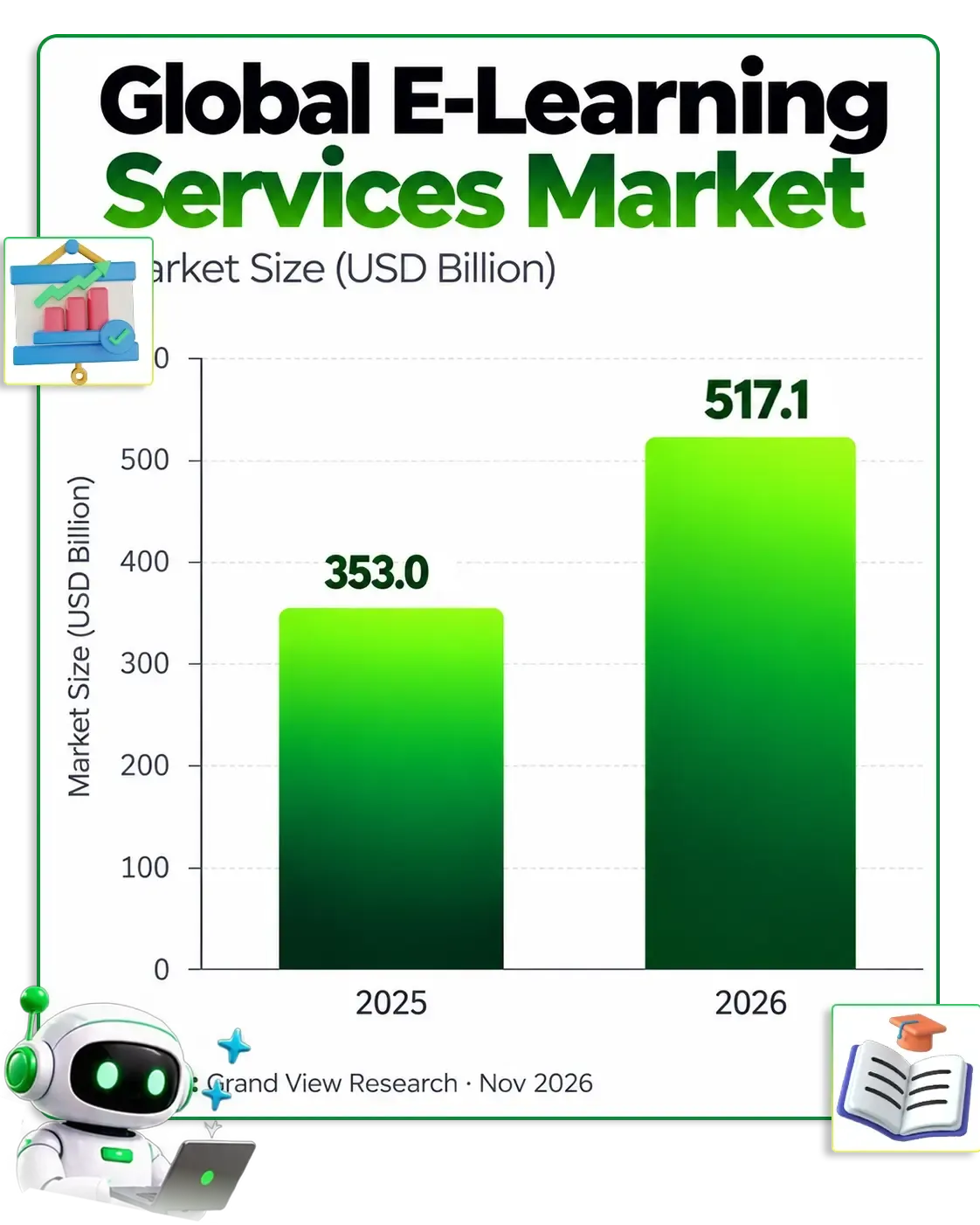
On the opportunity side, the vendor cites Grand View Research figures of a $353.0 billion global e-learning services market in 2025, estimated at $517.1 billion in 2026 — vendor-cited numbers, not independently verified here. The demand signal is easy to sanity-check: narrow-topic courses sell daily, and freelancers openly sell course-creation services on Upwork and Fiverr. The product's bet: removing the camera, editor, and tool stack is what stops most people from publishing.
Who It Is For — and Who Should Skip It
The sales page names its audience directly: the beginner with no content, no camera, and no starting point; the affiliate whose course has been "almost done" for a year; the freelancer who wants a productized service; anyone with knowledge but nothing for sale. The documented features match — the niche finder supplies topics, file import repurposes existing PDFs, and marketplace packs remove listing guesswork.
Good fit if you…
- Want a first course without a camera
- Own PDFs, docs, or videos worth repurposing
- Want to sell course creation as a service
- Prefer marketplace traffic over audience-building
Think twice if you…
- Need guaranteed marketplace approval (nobody can promise it)
- Produce long courses beyond the render cap
- Want hands-off, publication-ready accuracy (quality is unverified)
- Require an established vendor record (this is a new launch)

How It Works
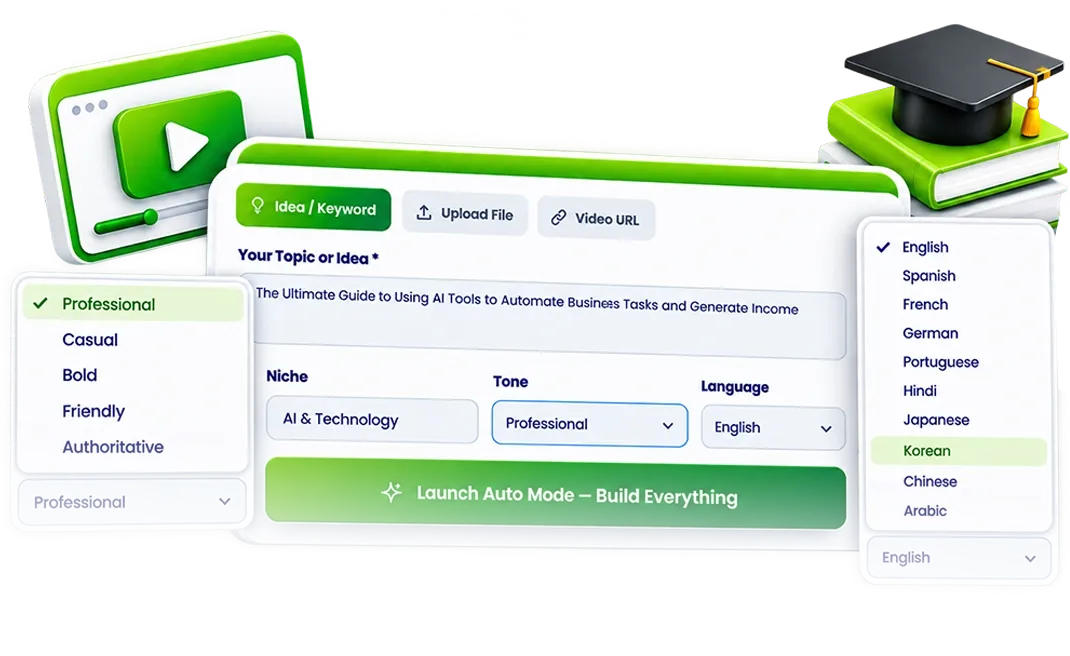
The documented workflow has three steps. First, provide an input: type a topic, upload a PDF, DOCX, TXT, MP4, MP3, or WAV file, paste a media URL, or let the niche finder pick an in-demand topic. Second, the agents run on one screen — the demo's "Auto Mode" queue shows Knowledge finishing while Product builds "course structure & scripts," then Offer, Sales Page, Marketplace, Launch, and Traffic. Third, download the MP4 lessons and listing pack, upload, and keep 100% of each sale.
One detail before you buy: the sales page names the agents Knowledge, Course, Video, Offer, Sales Page, Marketplace, and Update, while the demo interface shows Knowledge, Product, Offer, Sales Page, Marketplace, Launch, and Traffic, with video in a separate "Video Studio." The outputs overlap; the naming does not match exactly.

Demo Walkthrough, Timestamped
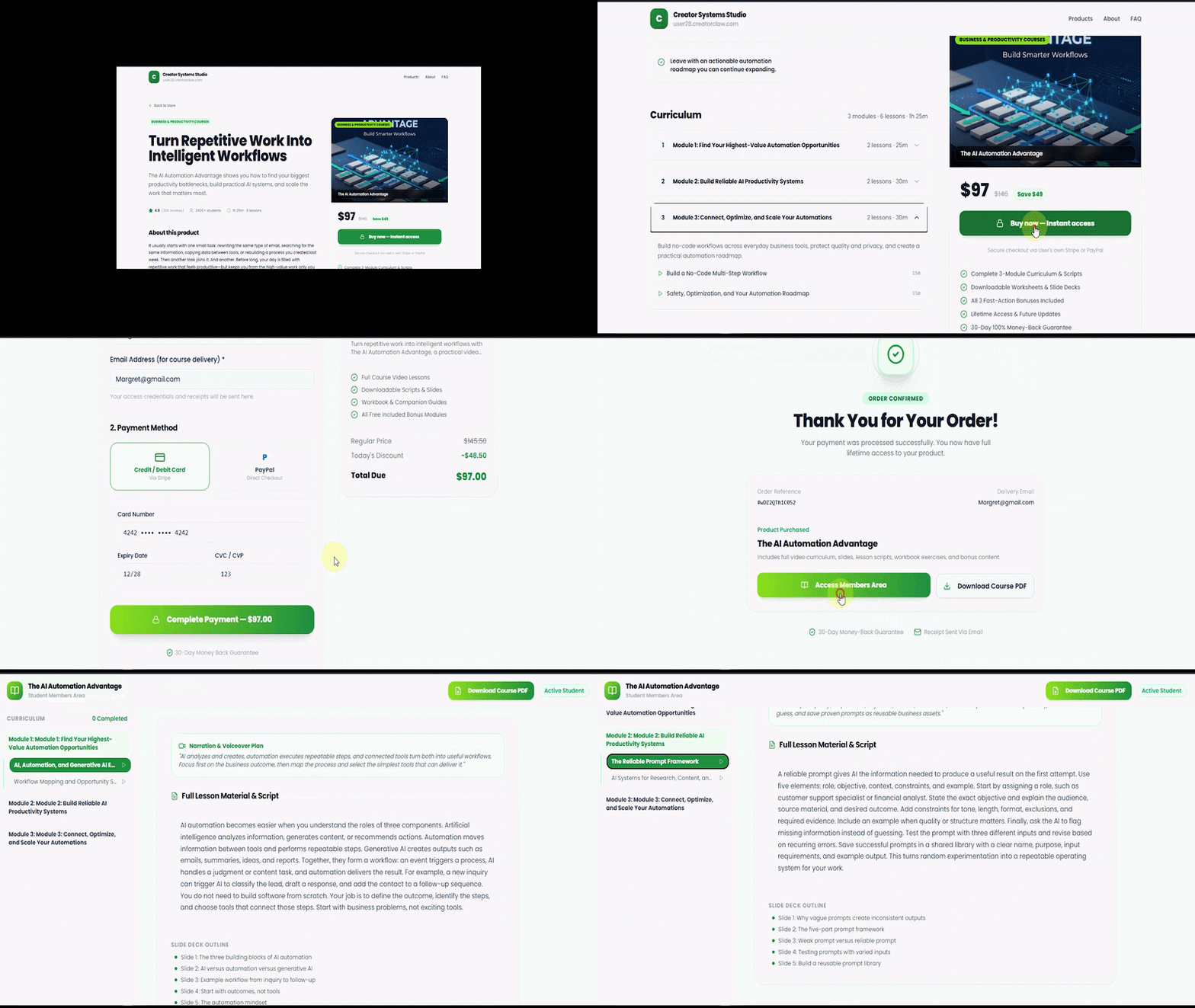
The video below is the official CreatorClaw AI demo from the launch material. I reviewed it frame by frame on October 13, 2026; timestamps are approximate, and everything described is visibly on screen.
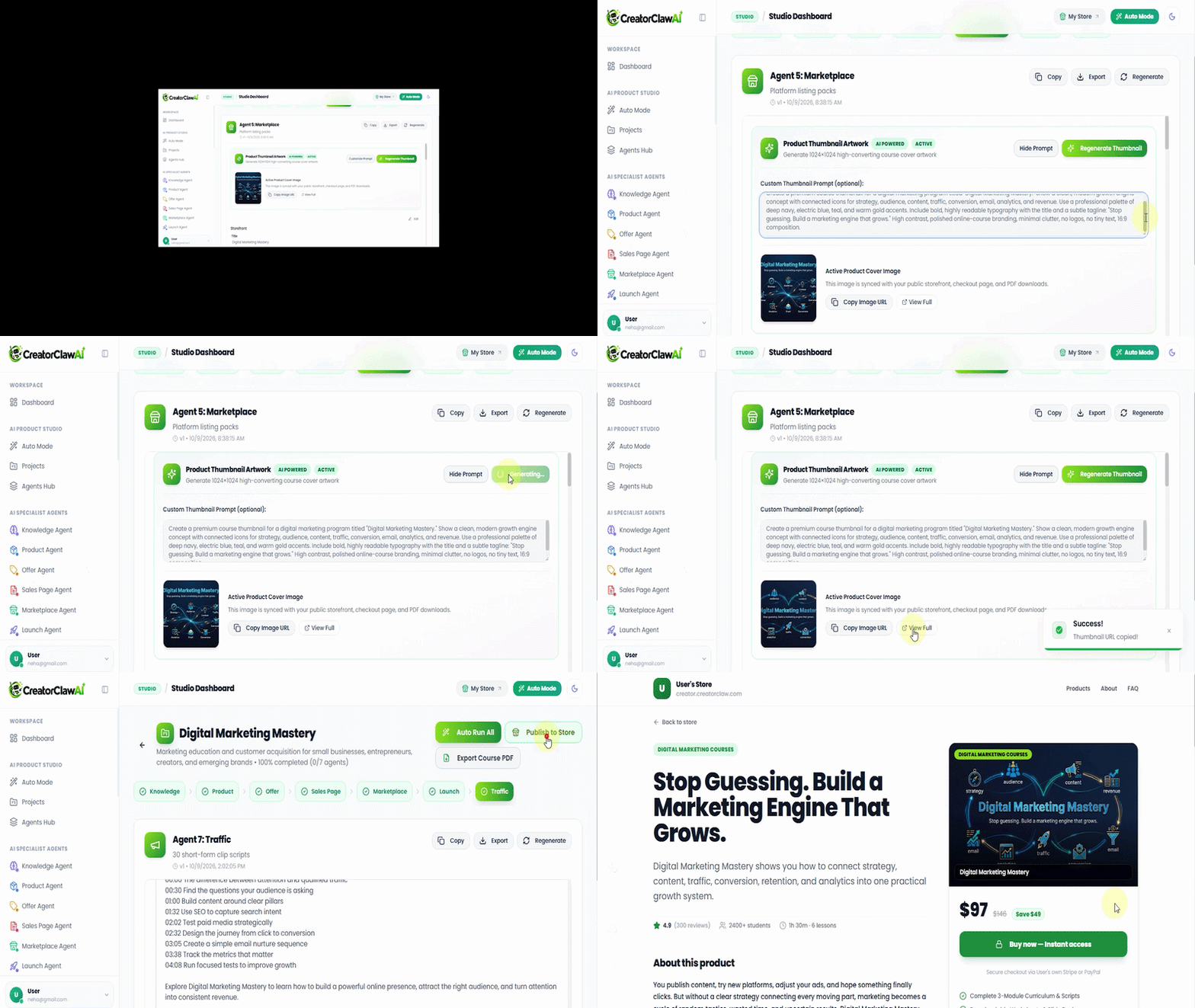
- ~0:05–0:20 — Dashboard and Auto Mode. The demo account starts at zero (0 projects, $0.00 revenue, 0 orders); Auto Mode then runs the pipeline — Knowledge Done, Product Running, five pending.
- ~0:35–0:50 — A completed project. "AI Video Creator: Build Viral Content for YouTube, TikTok and Instagram" shows "100% completed (7/7 agents)", a generated $27 downsell, and thirty clip scripts with hashtags.
- ~1:05–1:20 — Sales page and course PDF. A generated product page shows "Buy Now — Instant access" (checkout "via Account Demo's own Stripe or PayPal") with three bonuses labeled $197/$147/$247; the exported PDF is a 46-page "Verified Student Guide."
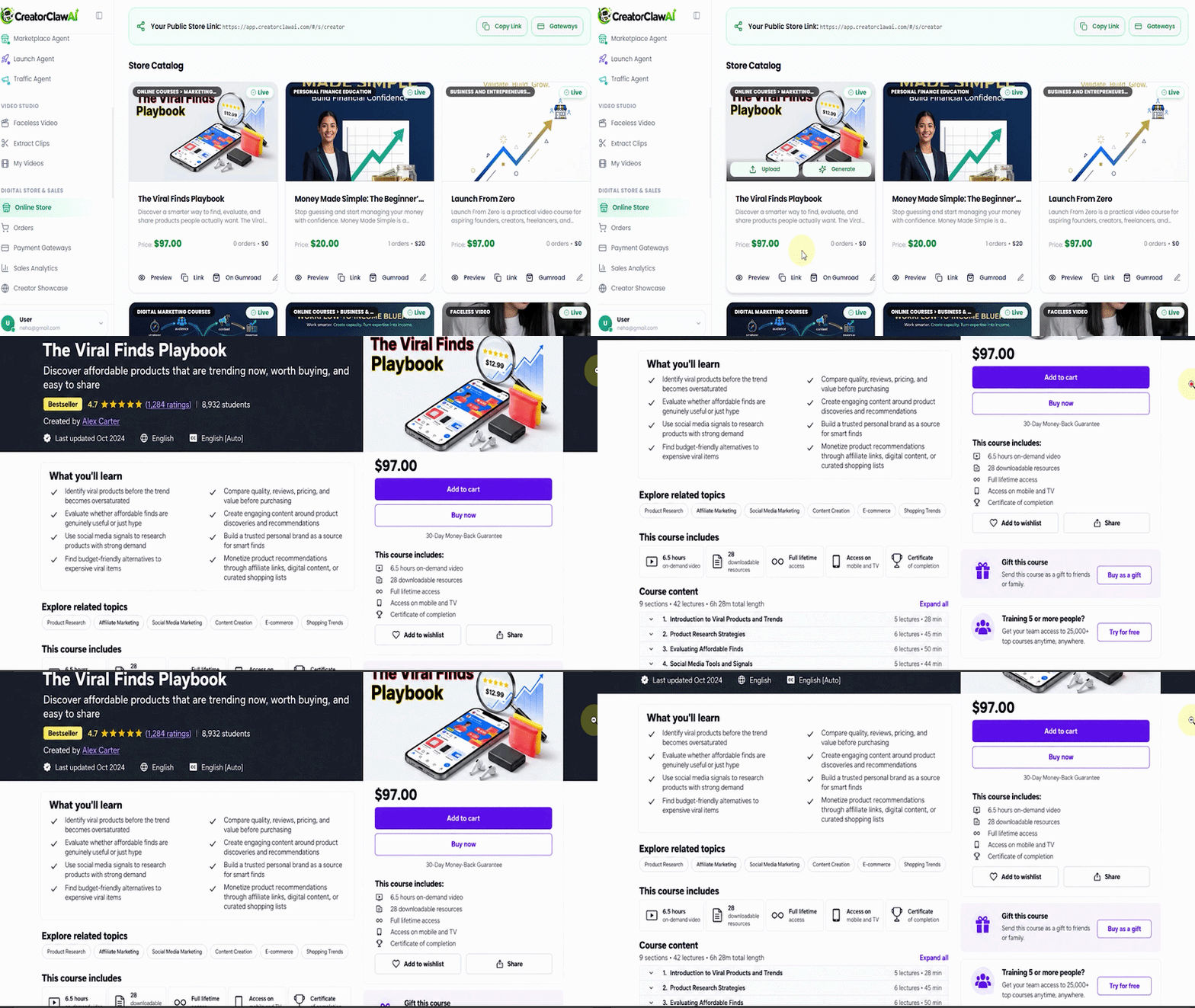
- ~1:35–2:05 — Store and import options. The store shows 1 live product, 1 order, $97.00 in sales, a public store link, and an Edit Product dialog; the Knowledge Agent's import screen lists Topic/Keyword, Upload File (PDF, DOCX, TXT, MP4, MP3, WAV), or Media URL (.mp4/.mp3) — no explicit YouTube option appears.
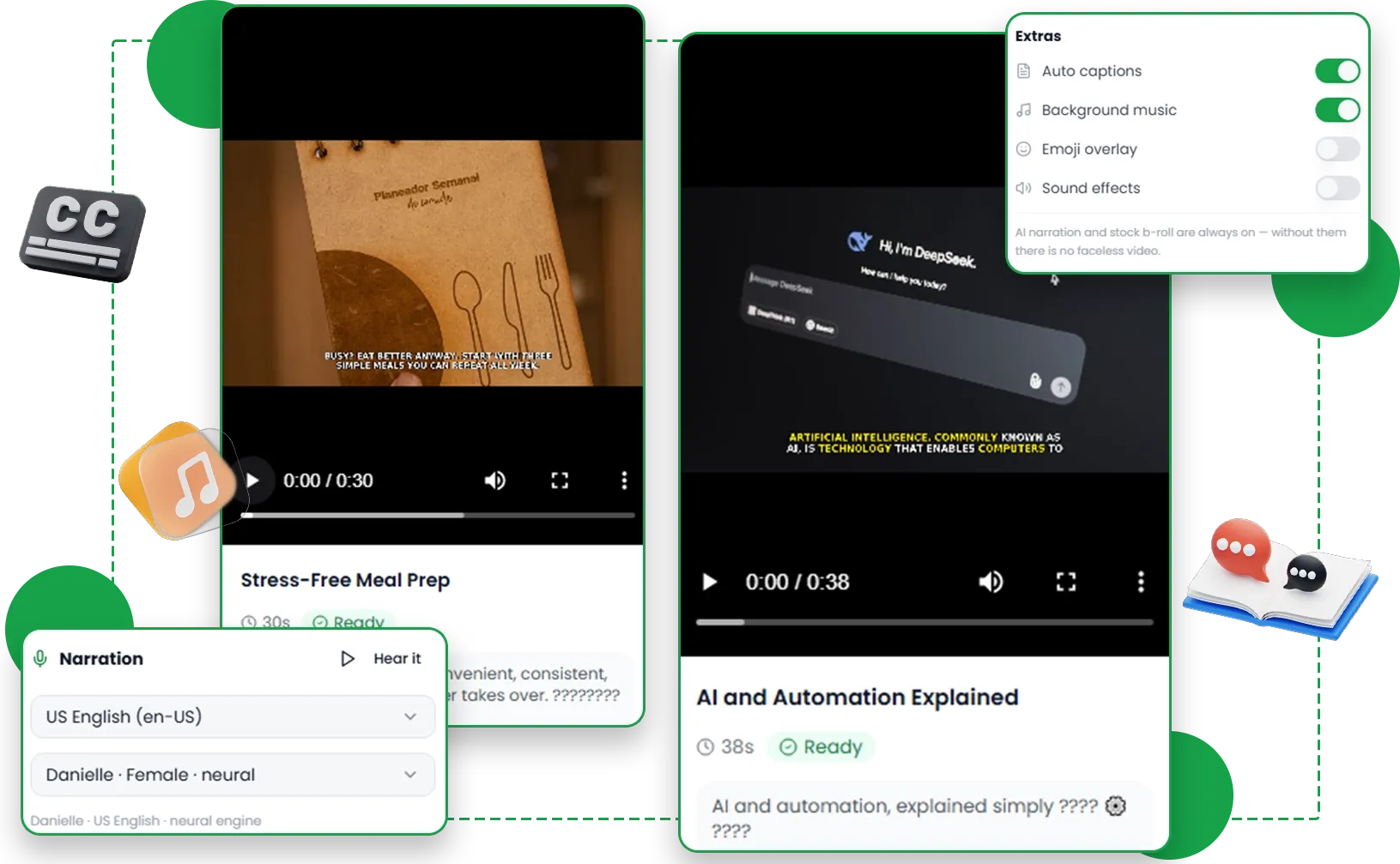
- ~2:20–3:20 — Sales Page Agent, Faceless Video, render. Copy "in 3 templates (Story, Problem-Agitate-Solve, Proof-Heavy)"; Faceless Video then turns a script into "an AI-narrated video over stock footage" — and a finished 0:54 vertical result marked Ready.
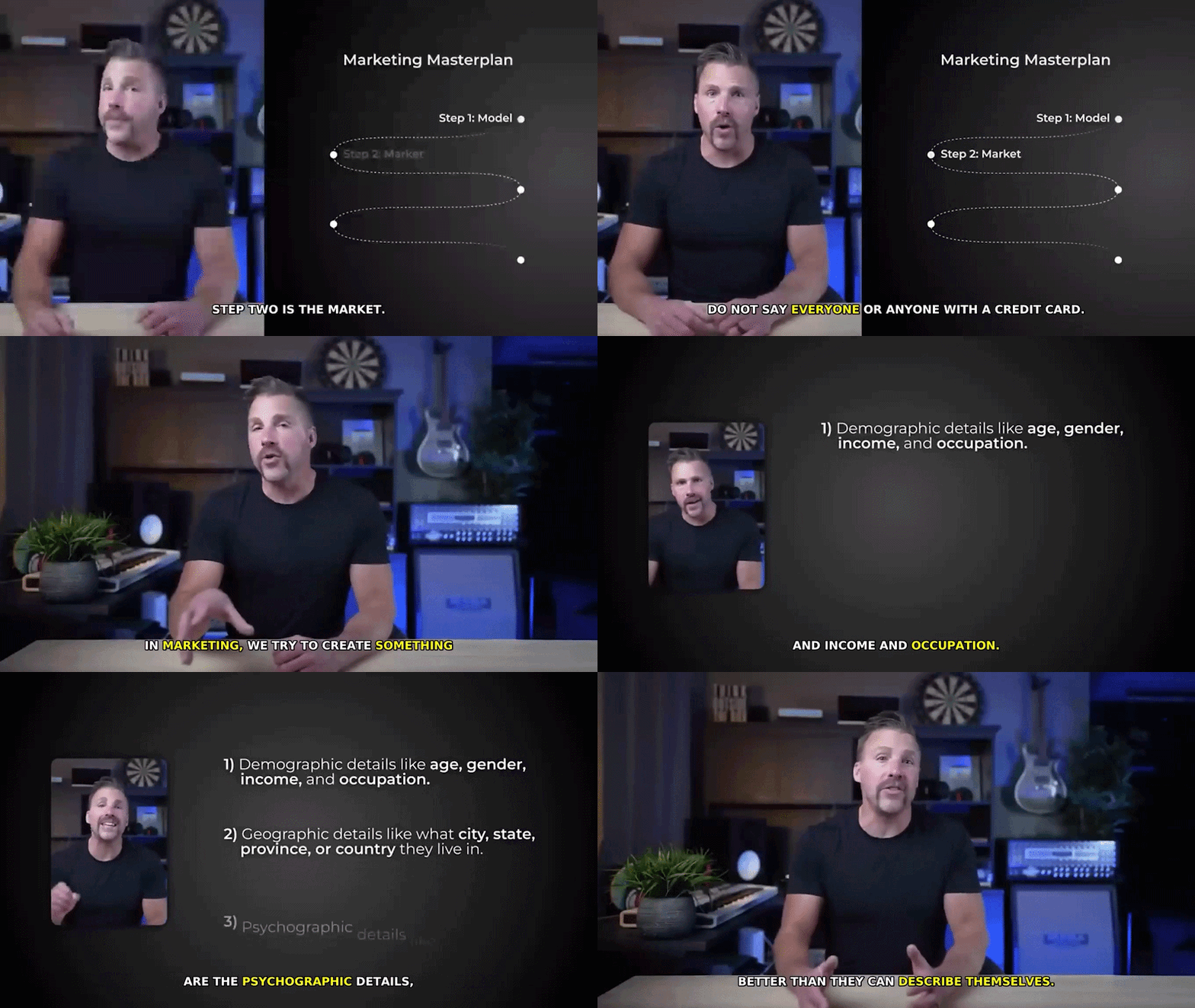
- ~3:35–4:05 — Extract Clips. Uploads up to 350 MB / 60 minutes, Google Drive, or a direct link; caption and B-roll toggles; "7 clips extracted."
- ~4:20–4:35 — Store and orders. Three products ($24, $12, $97) and one completed $97 Stripe order in the demo account.
Feature Analysis: What Each Documented Feature Means for Buyers
Course engine: outline, scripts, quizzes, workbook
The launch checklist documents a full curriculum — modules, lessons, quizzes, workbook — and the demo's 46-page student guide shows the pipeline produces substantial material. The implication is time: weeks of writing collapse into minutes. Unverified: accuracy — AI lessons need a fact-check before you sell them.
Video Studio: faceless videos, voiceover, clips
"Faceless Video" turns a script into an AI-narrated video over stock footage with selectable voices and captions — the rendered sample runs 54 seconds. "Extract Clips" cuts long uploads into captioned shorts (max 350 MB / 60 minutes on screen). Who benefits most: repurposers and camera-shy beginners. Unverified: full-length lesson rendering, documented but not demonstrated.
Listings, promo assets, store, and exports
The Marketplace Agent is documented to format listings for Udemy, Skillshare, Gumroad, and Teachable — SEO titles, keywords, learning objectives, covers — while promotion adds clip scripts, hashtags, and promo emails; for first-time sellers this is the most valuable part. The front end includes one marketplace format; all four unlock in Pro. The demo also shows a connected store with Stripe/PayPal checkout and CSV export, but the launch table places the fuller storefront (custom domain, members area) in OTO 3 — resolve that boundary if selling direct matters.
Evidence and Claim Check: What the Demo Does and Does Not Prove
| Claim or item | Source type | Status for buyers |
|---|---|---|
| Agent pipeline produces curriculum, copy, listings, clips | Demo observation | Shown on a completed 7/7-agent project |
| 46-page PDF; rendered 54-second video | Demo observation | Visible; full-length render not shown |
| "GPT-6 Astra"; "40 hours saved" | Vendor claim | Not independently verified; marketing framing |
| Import from YouTube links | Vendor claim | Demo lists files and .mp4/.mp3 URLs only |
| Agent lineup (Course, Video, Update…) | Vendor claim vs demo | UI labels differ — unresolved |
| $97 order in the demo store | Demo observation | One order in a demo account; no demand proven |
| Marketplace approval | Unknown | Not demonstrated in the supplied material |
The honest reading: the CreatorClaw AI demo shows the workflow exists and produces real artifacts. It does not prove output quality at scale, stability, or any income outcome. "Is CreatorClaw AI legit?" deserves that boundary — a legitimate offer with a verifiable demo is not a verified performance record.
Practical Limitations, Dependencies, and Unknowns
- Front-end caps: 10 courses/month, 30 minutes of render, standard voices, one marketplace format; whether the render allowance is monthly or per course is unspecified.
- Upgrade dependencies: the Update Agent, premium voices/avatars, all formats, HD export, priority rendering, and unlimited caps are documented as Pro features.
- Source conflicts: the review-side configuration lists a "CREATOR" coupon ($4 off funnel) while the vendor's page promotes "EARLYCLAW" (10% off); a second supplied source lists a different OTO lineup and a $16 FE price against the official $17. This review uses $17 and flags the rest.
- Output quality: no independent testing was performed; review AI scripts and covers before publication.
- Vendor identity: not named in the supplied material, and the product is too new for a public track record.
Pros and Cons
Pros
- Broad documented front end for a $17 launch offer
- Official demo shows real outputs, not mockups
- Commercial license — sell what you make, keep 100%
- Listing packs remove marketplace-format guesswork
- 30-day money-back guarantee stated on the sales page
Cons
- Caps on courses, render minutes, voices, and formats
- Output quality unverified by independent testing
- Coupon and OTO information conflicts across sources
- Marketplace approval never guaranteed
- No public vendor identity or track record
CreatorClaw AI Pricing and Funnel Breakdown
The front end is listed at $17 one-time during launch, against a claimed $97/month regular price. The launch material lists five optional upgrades with downsell prices, plus a $267 bundle described as everything in one purchase. No bundle link was supplied, so this is factual coverage — not a bundle recommendation.
| Offer | Listed price | Documented inclusions |
|---|---|---|
| Front End | $17 one-time | All 7 agents; 10 courses/mo, 30 min render, standard voices, 1 marketplace format |
| OTO 1: Pro / Unlimited | $47 (DS $37) | Unlimited courses/minutes, Update Agent, premium voices, all formats, HD, priority rendering |
| OTO 2: DFY Course Pack | $67 (DS $47) | 50 ready-made courses with videos and listings |
| OTO 3: Storefront | $67 (DS $47) | Storefront, custom domain, checkout, members area, buyer list |
| OTO 4: Agency | $127 (DS $97) | Client accounts, white-label, domain per client store, contracts |
| OTO 5: Reseller | $197 (DS $147) | Sell CreatorClaw AI as your own, keep 100%, materials included |
| Bundle (no link supplied) | $267 | Described as everything above in one purchase |
CreatorClaw AI OTO Buying Guide
Each upgrade below comes from the launch material only. For every OTO, ask: which documented front-end limitation does it remove, and does it block your plan?
OTO 1 — Pro / Unlimited ($47, downsell $37)
Removes: course and video-minute caps, standard-only voices, the single-format limit; unlocks the Update Agent, HD export, priority rendering. Who needs it: catalog builders and multi-platform sellers. Who can skip it: first-course buyers inside the caps. Ambiguity: a second supplied source splits Pro and Unlimited into two differently priced upgrades — verify the live funnel.
OTO 2 — DFY Course Pack ($67, downsell $47)
Adds: 50 ready-made courses with videos and listings in top niches. Who needs it: buyers who want instant inventory. Who can skip it: anyone with a clear topic — uniqueness matters on marketplaces.
OTO 3 — Storefront ($67, downsell $47)
Adds: personal storefront, custom domain, checkout, members area, buyer list. Who needs it: sellers who want direct sales and their own list. Who can skip it: marketplace-first beginners. Open question: the demo already shows a basic store; the FE-vs-upgrade boundary is undocumented.
OTO 4 — Agency ($127, downsell $97)
Adds: client accounts, white-labeling, a custom domain per client store, contracts. Who needs it: agencies selling course creation as a service. Who can skip it: solo creators selling their own courses.
OTO 5 — Reseller ($197, downsell $147)
Adds: the right to sell CreatorClaw AI itself, keeping 100% of front-end revenue, materials included. Who needs it: buyers whose goal is reselling. Who can skip it: nearly everyone else.
Funnel caution: the sources do not agree on this funnel. The launch table lists the five upgrades above plus a $267 bundle; a second supplied source lists six different upgrades (a $97 "Club," a $397 Whitelabel) and a $16 front-end price. Where sources conflict, this review defers to the official sales page and launch table, flags the rest as unresolved, and advises confirming each upgrade at checkout.
Total Funnel Cost (From Listed Prices Only)
| Scenario | Calculation | Total |
|---|---|---|
| Everything at listed OTO prices | $17 + $47 + $67 + $67 + $127 + $197 | $522 |
| Everything at documented downsell prices | $17 + $37 + $47 + $47 + $97 + $147 | $392 |
| "CREATOR" coupon, $4 per item (assumed eligibility) | $522 − ($4 × 6) | $498 |
| "CREATOR" coupon at downsells (assumed eligibility) | $392 − ($4 × 6) | $368 |
Totals use only the launch table's displayed prices and assume every upgrade is purchased — which most buyers do not need. A workable first-course setup is the front end alone at $17 (or $13 if the CREATOR code applies as described); coupon totals are checkout-dependent assumptions, not verified offers. The listed $267 bundle would cover all six items if its description holds.
Vendor Bonuses
Per the sales page, ordering during the launch window includes 200 reseller licenses free — a vendor-claimed $997 value — for creating and selling courses for other people. The "Total Value: $6,170" stack is vendor arithmetic over its own component list, not an independent appraisal. Reseller-license terms are not documented in the supplied material.
We also provide a 280+ buyer bonus library for qualifying purchases through our link; see the full bonus section near the end of this review.
CreatorClaw AI Alternatives
No competitor pricing or feature data was supplied, so here is a selection guide between realistic paths to a video course rather than a misleading table:
| Path | Pricing model | Trade-off | When to choose it |
|---|---|---|---|
| DIY tool stack | Multiple subscriptions | Max control, highest cost | You already edit professionally |
| Hire a freelancer | Per-project fees | Delegated quality; slow turnaround | You have budget and a finished curriculum |
| All-in-one AI course suite | One-time fee or subscription | Speed over fine control | You want a first course today; caps acceptable |
| Stay an affiliate | $0 product cost | No asset ownership; a split, not 100% | You want income before building a product |
If you are comparing AI content tools more broadly, our separate Neura AI review offers a second reference point from the same evaluation process. The fair question for any option — including this one — is which outputs you would publish without rework.
Buyer Scenarios: Which Option Fits Which Reader
- The complete beginner: front end alone — niche finder for a topic, one marketplace format for a first listing.
- The affiliate with a stalled course: front end, plus Pro only if your material exceeds the render cap.
- The service seller: front end plus Agency for documented client rights; confirm the 200-license bonus terms.
- The catalog builder: front end plus Pro; DFY only if ready-made inventory fits.
Proposed evaluation (hypothetical, not performed): a fitness coach imports a 40-page PDF and generates a five-lesson course with standard voices. At 25–30 minutes of finished video, the render allowance is binding — a smaller course fits; a longer one needs Pro.
Proposed evaluation (hypothetical, not performed): a freelance marketer builds two clients a three-module course monthly. Ten courses/month is ample, but client delivery raises licensing questions the front end does not answer — the documented route is Agency, making the realistic cost $144 before discounts.
Pre-Purchase Checklist
- Confirm the live price and which coupon code the checkout actually accepts.
- Check the course and render-minute caps in the members area before planning.
- Generate one complete lesson and read its script critically before listing.
- Review your target marketplace's quality and AI-content policies yourself — no tool guarantees approval.
- Read the vendor's refund terms at checkout, save the support email, and confirm what the "200 reseller licenses" bonus covers.
- Decide FE vs Pro on one variable: will you exceed the documented caps within 30 days?
Frequently Asked Questions
Is CreatorClaw AI legit?
It is a real, demonstrable software offer: the official demo shows a working dashboard, completed projects, and real files, and the sales page states a 30-day guarantee. "Legit" does not mean "guaranteed to earn" — no income, traffic, or approval outcome is verified, and the vendor's disclaimer says results depend on your topic, listing, and effort.
Do I need any CreatorClaw AI OTO upgrade to launch a first course?
No. The documented front end covers the entire pipeline from topic to listing pack. Upgrades matter only when you hit documented limits: volume (Pro), inventory (DFY), direct selling (Storefront), clients (Agency), or reselling (Reseller).
Did you test CreatorClaw AI with a paid account?
No. This is a demo-walkthrough review; the CreatorClaw AI demo observations above are timestamped so you can verify them against the vendor's own video.
What is the refund policy?
The official sales page states a 30-day money-back guarantee, administered by the vendor. Because it is vendor-controlled, read the exact terms at checkout and keep your receipt.
How do the bonuses on this page work?
Purchases through the eligible link on this review qualify for the 280+ buyer bonus library near the end of this page. The bonuses come from our team, not the vendor, and are separate from the core product.
Final Verdict
This CreatorClawAI review set out to answer one question: does the evidence support buying the front end at $17? For the documented buyer — a beginner or stalled affiliate who wants a sellable video course package without cameras or editing software — the answer is a qualified yes. The demo shows a real pipeline producing real artifacts, the license and listing packs are plainly documented, and the entry price is low and one-time.
The qualification matters. Everything that would make this a great long-term tool — output quality at scale, render reliability, marketplace acceptance, vendor longevity — is unverified, and the sources disagree on coupons and even the upgrade lineup. Buy the front end for a first course within the caps; treat each upgrade as a decision triggered by a limit you have hit; verify coupon, render allowance, and refund terms at checkout.
280+ Exclusive Bonuses — Buyer Bonus Library
If you purchase through an eligible affiliate link on this page, you also qualify for the Nexa Scale AI Review buyer bonus library — 280+ tools, templates, courses, and software assets assembled by our team. These bonuses are separate from, and not part of, the vendor's core product or the vendor's own launch bonuses.
| Category | What's inside |
|---|---|
| Traffic Software Suite | 12 items — social traffic tools for Facebook, Instagram, Pinterest, Twitter, and more |
| Done-For-You Funnels & Campaigns | 10 items — complete funnels, DFY campaigns, CPA templates |
| Money-Making Systems & Training | 13 items — step-by-step systems and courses |
| CPA Marketing Mastery | 8 items — CPA courses, case studies, guides |
| Premium Software & Tools | 14 items — page builders, pop-ups, autoresponders, utilities |
| Social Media & Email Marketing | 8 items — social software and email-marketing training |
| Design, Video & WordPress Packs | 7 items — builder packs, graphics, license rights |
| VIP & Coaching Access | 5 items — coaching registration, passive-income resources |
View the complete bonus breakdown
1. Traffic Software Suite
Facebook Traffic Software · Instagram Traffic Software · Pinterest Traffic Software · Twitter Traffic Software · Sociquick Traffic Software · Viral Source Software · Smart Commenter (FB Comments) · Post Viper · Twitter Tornado · 24 Hour Traffic Machines · Traffic Training Course · Pinterest Traffic Goldmine
2. Done-For-You Funnels & Campaigns
DFY Funnel (Easiest System Ever) · Goodwill Funnel · 5 Done-For-You High Ticket Funnels · DFY Campaigns Part 1 · DFY Campaigns Part 2 · DFY CPA Campaigns · DFY CPA Templates · My Special Freebie Funnel — Goodwill · 80 DFY Bonuses Pack · 60+ Done For You Bonuses
3. Money-Making Systems & Training
From Broke to $100K Per Month · $10,000 Per Month System · 1K Daily System · $100 Per Day System · $100 Per Day From Your Phone · Get Fast Cash Five · Money Monster · EZ Passive Paydays · Cash Magnets · 9 Minute Commissions · Simple Arbitrage Method · How to Make Money With Solo Ads · 30% of My Affiliate Traffic
4. CPA Marketing Mastery
Advanced Course on CPA · CPA Video Case Studies · Fast Profits with CPA · How to Build a List with CPA · CPA Pirate · CPA Freebooter · First 24 Hours CPA Guide
5. Premium Software & Tools
Boomerang Buddy Pro · Kartel Pro · Aurora Pro · Octane Pro · Ecompare Software · II Stores Software · FB Quiz Creator · Discount Zone Creator · Pop Up Pro Creator · Vid Chomper · Tube Raider · Squeeze Page Creator · Autoresponder for Peanuts · My Autoresponder Contact
6. Social Media & Email Marketing
Facebook Ninja · Instagram Wizard · Pinterest Marketing Software · 10K Email Manifesto · Headlines That Sell · Adwords Retargeting Training · Kartel Pro Version · Goodwill Pro Version
7. Design, Video & WordPress Packs
WordPress Builder Bonus Pack · Graphic, Video and Design Bonus Pack · 50 Background Images · Big Bonus Bundle · 5 Best Selling Products · Early Copy of Enigma · Enigma License Rights
8. VIP & Coaching Access
Private Coaching Registration · My Passive Income Sources Revealed · Crash Course · Penny Click on Gurus — Eclipse · Get Passive Paydays
To claim: buy through an eligible link on this page, then send your proof of purchase (receipt or transaction ID) via our Contact page or email hello@nexascaleaireview.com. Bonuses are delivered by email within 24–48 hours after successful verification. Some bonus titles mention dollar amounts — those are product or course names, not income promises, and no earnings are guaranteed. "Exclusive" means this buyer package is offered to qualifying purchasers through this site's link, not that every underlying item is unavailable elsewhere.
Bonus eligibility note: only purchases completed through an eligible affiliate link on this review qualify. Proof of purchase may be required. The bonus library is delivered separately by Nexa Scale AI Review and is not part of the vendor's core product, vendor support, or the vendor's refund process.
Sources and Research Method
- Official CreatorClaw AI sales page — pricing, feature claims, guarantee statement, coupon promotion, disclaimer.
- Official JV / affiliate page and supplied launch document — funnel table (FE, five OTOs with downsells, bundle), bonus terms, buyer-facing copy.
- Official product demo video (embedded in this review) — reviewed frame by frame on October 13, 2026; timestamped observations above.
- Review-side configuration — the front-end affiliate link and "CREATOR" coupon supplied for this review; conflicting codes and prices are flagged, not silently reconciled.
Method: evidence was classified into verifiable facts, vendor claims, demo observations, and unknowns. No paid account was accessed, no output-quality testing was performed, and no keyword or traffic metrics are cited because none were independently verified. Market figures in vendor copy are attributed to the vendor's citation of Grand View Research and were not re-verified.
About the Reviewer
Aakif Kausar is the editor behind Nexa Scale AI Review's launch-software reviews. He evaluates official sales and JV materials, vendor demonstrations, funnel pricing, licensing information, documented limitations, and buyer fit to help readers make clearer purchase decisions. Unless a review explicitly states otherwise, the analysis does not claim long-term use of the paid product. Nexa Scale AI Review welcomes factual corrections through its Contact page, and you can learn more about the site on the About page.
Last Verified / Correction Note
This review was last verified on October 13, 2026, against the official sales page, launch material, and demo video supplied at that date. Launch pricing, coupons, and funnel structures change without notice. If you spot a factual error — a price, a feature, a demo observation — send it through the Contact page; corrections are applied promptly.